Base AI Models vs. Tool-Connected AI: What Your Chatbot Can’t Do

by Rafael Ramos | Jul 26, 2026 | Real-World Use | 0 comments
Introduction

You set up a customer support chatbot. Users engage with it, share details, explain their issues. The bot handles the first session well.

But the second time a user returns, the bot greets them as if they have never spoken before. It asks for the same information. It restarts from zero. The user is frustrated. You are puzzled - the bot worked fine.

This is one of the most common gaps in conversational AI design. And it almost always comes down to the same root cause: a mismatch between what the designer expected the AI to remember and what the AI system is actually capable of.

This article clarifies the distinction between base AI models and tool-connected AI systems - what each one can do, where each one stops, and how to design chatbot flows that work within the right boundaries. Understanding this distinction will save you from building systems that fail in ways that are difficult to diagnose.

Two types of AI system - one critical difference

Not all AI systems work the same way. The term "chatbot" gets applied to a wide range of setups, from simple single-turn responders to complex multi-session assistants. Two terms help clarify the landscape:

Term What it means
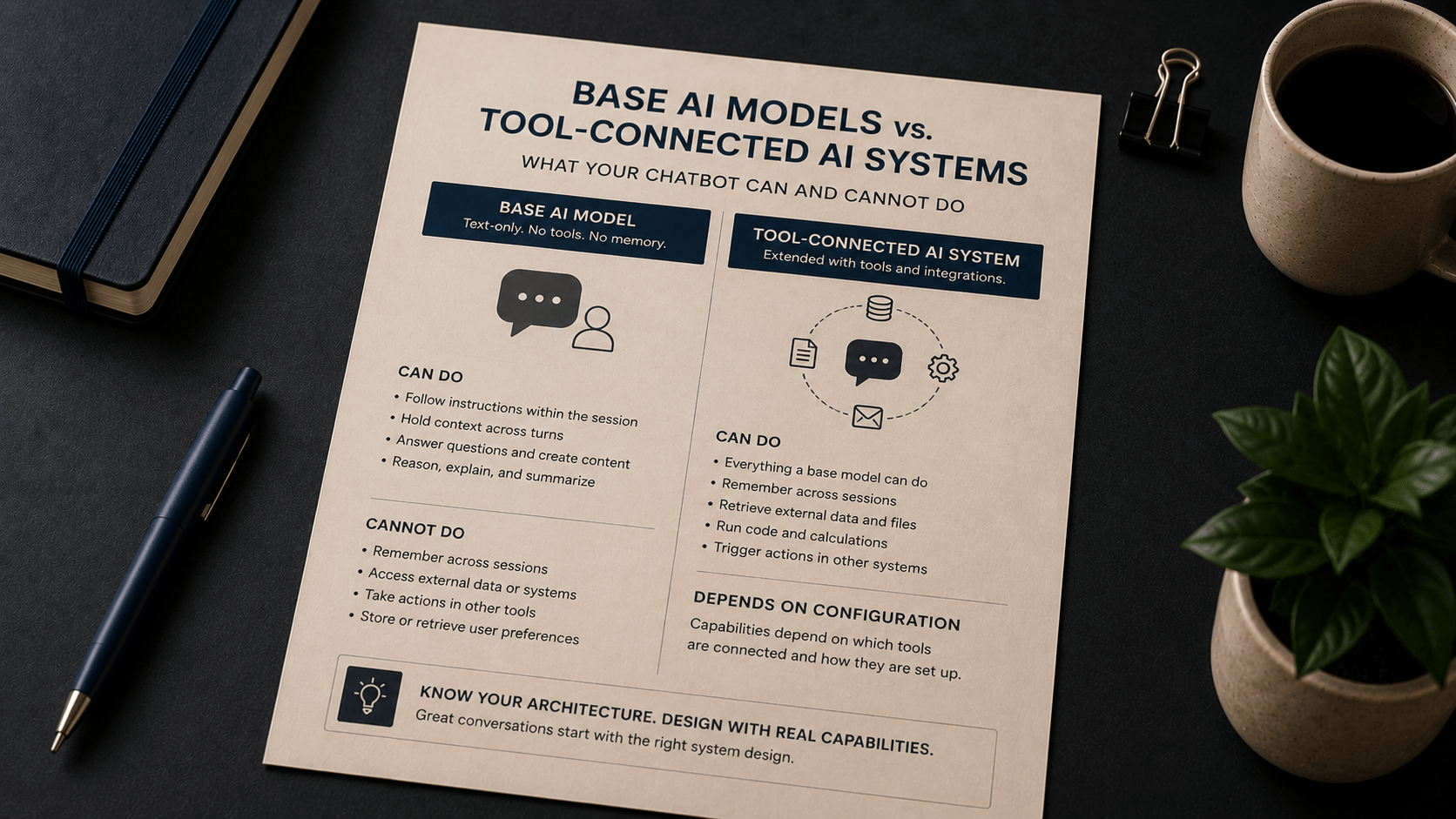
Base AI model A text-only AI system with no tool access, no memory, and no external data connections. It receives a prompt and produces a response. When the session ends, everything is gone.
Tool-connected AI system An AI system that may access memory, run code, retrieve files, or connect to external integrations beyond text-only reasoning. Capabilities depend on how the system is configured.

These are not two versions of the same product. They are fundamentally different architectures. A base AI model processes the text it receives in a single session and produces a response. A tool-connected AI system can, depending on its configuration, store notes between sessions, retrieve records from a database, run a calculation, or pass information to an external service.

Most beginner chatbot projects start with a base model. That is a reasonable place to begin. But it becomes a problem when designers assume capabilities the base model does not have - and build flows that depend on those missing capabilities.

What a base AI model can and cannot do

A base model is capable and useful within its context window. During a single session, it can hold the full conversation history, follow persona instructions, maintain a consistent tone, and work through multi-step reasoning.

Here is what a base model handles well:

  • Following a system message to define its role, tone, and scope
  • Responding to multi-turn questions within a single session
  • Maintaining context across turns as long as the conversation fits within the context window
  • Drafting, editing, explaining, summarising, and structuring content
  • Applying examples and constraints from the same session

Here is where a base model stops:

  • When the session ends, all context is erased. The next session starts completely fresh.
  • It has no access to external databases, APIs, calendars, or files unless those are passed in directly within the prompt.
  • It cannot initiate actions in other systems - sending emails, updating records, or triggering workflows.
  • It cannot retrieve a user's previous conversation history.
  • It cannot store a user preference from one session and apply it in the next.

These are not bugs or limitations that will be fixed in a future update. They are defining characteristics of the base model architecture. A base model processes text within a session. That is what it does.

What a tool-connected AI system adds

A tool-connected AI system is a base model extended with additional capabilities through integrations. The AI core is still doing text reasoning, but it now has access to tools that let it act beyond the prompt.

Depending on how the system is configured, a tool-connected AI system may be able to:

  • Retrieve a user's stored preferences or history from a database
  • Look up records, orders, or account information in real time
  • Write a note back to a memory store so it is available in the next session
  • Run a calculation using a code execution tool and return the result
  • Pass a trigger to an external service - creating a support ticket, updating a CRM record, or scheduling a follow-up

The key phrase is "depending on how the system is configured." A tool-connected AI system is not a single product with a fixed set of capabilities. It is an architecture. The tools that are connected, and how they are set up, determine what the AI can do. Two tool-connected systems can have very different capability sets.

This matters for chatbot design because the tools do not activate by default. Someone has to build, connect, and configure them. If you are working with a platform that does not yet have those integrations in place, the AI behaves like a base model, regardless of what it is labelled.

A concrete comparison: the same chatbot scenario, two architectures

Here is the same customer support scenario run through each architecture. The scenario: a returning user contacts support about an ongoing issue with their subscription.

With a base AI model

Session 1
User Hi, I'm having trouble with my subscription renewal.
Bot Happy to help. Can you tell me your name and the issue you're experiencing?

[Conversation continues. User provides details. Bot responds helpfully within the session.]

Session 2 (the next day)
User Hi again - I wanted to follow up on that subscription issue.
Bot Hello! How can I assist you today?

The bot has no memory of Session 1. It does not know the user's name, the issue they described, or the steps already taken. The user must start over.

With a tool-connected AI system (configured with memory and a CRM integration)

[Same exchange as above in Session 1. At the end of the session, the AI writes a summary to the user's record: issue type, steps discussed, open status.]

Session 2 (the next day)
User Hi again - I wanted to follow up on that subscription issue.
Bot Hi - I can see from our last conversation that you were working through a renewal issue. Has anything changed since we last spoke?

The difference is not a smarter AI. It is an AI with access to a memory tool and a customer record system. The text reasoning is the same. The architecture is different.

This distinction matters when you are designing the flow. If you promise users a personalised, memory-aware experience but deploy a base model with no tool connections, the system will fail in ways that feel like poor AI performance - but the real cause is a design decision made before the conversation started.

Common mistakes when the distinction is blurred

Most chatbot design errors involving this distinction follow a recognisable pattern. The designer assumes a capability the architecture does not have, builds a flow around it, and discovers the problem in testing or in production.

Mistake 1: Designing for cross-session memory without a memory tool

The flow assumes the bot will remember the user from a prior session. Opening messages reference past interactions. Personalisation is built in. But the underlying system is a base model with no memory store.

The correction: Review your use case requirements before choosing an architecture. If the flow depends on information from a prior session, you need a tool-connected system configured to store and retrieve that information. If you are working with a base model, design each session to collect the context it needs from scratch.

Revised opening prompt: "To get started, could you share your name and what you're working on today? That helps me give you the most relevant help."

Mistake 2: Assuming the AI can take action in external systems

The flow includes a step where the bot confirms a booking, updates an order, or sends a follow-up email. These are actions in external systems. A base model cannot initiate them.

The correction: If your use case requires the AI to act outside the conversation - updating a record, triggering a notification, completing a transaction - that requires a tool-connected system with the relevant integrations configured. A base model can draft a message, but it cannot send one.

Mistake 3: Describing a tool-connected capability to stakeholders without clarifying the infrastructure required

You demo a memory-aware chatbot built on a fully configured tool-connected platform. Stakeholders approve it. The deployment environment has none of the required integrations. The deployed version behaves like a base model.

The correction: When presenting a conversational AI design, be explicit about which capabilities require tool connections and what infrastructure those connections depend on. Separate what the AI can do from what the system around it enables.

How to design within the right boundaries

Each of those mistakes traces back to the same gap - architecture was chosen before requirements were confirmed. The four questions below close that gap before the first prompt is written.

The practical question is not "which architecture is better?" It is "which architecture matches what my use case actually requires?"

Work through these questions before you start building:

  • Does the conversation need to continue across sessions? If yes, you need a memory tool. If no, a base model session is sufficient.
  • Does the bot need to look up external information in real time - account status, order history, inventory? If yes, you need a retrieval or database tool. If no, you can pass the relevant information directly into the prompt.
  • Does the bot need to take actions in other systems - creating tickets, sending emails, updating records? If yes, you need integration tools. If no, the bot can draft outputs for a human to act on.
  • Is the information the bot needs static or dynamic? Static information - FAQs, policy documents, product details - can often be included directly in the system message or prompt. Dynamic information - specific user account data, live availability - requires a retrieval tool.

For simpler use cases - FAQ responders, onboarding guides, single-session support flows - a base model with a well-designed system message often covers the requirements without any additional tools. The Finn onboarding assistant example from Chapter 5 works this way: the persona, scope, and constraints are defined in the system message. No external tools are needed for a single-session onboarding flow.

For more complex use cases - returning-customer support, personalised assistants, multi-session workflows - a tool-connected system is required. The design work shifts from prompt engineering alone to prompt engineering plus integration architecture.

Key Takeaways

  • A base AI model has no memory between sessions. Each session starts completely fresh, with no knowledge of prior interactions.
  • A tool-connected AI system can access memory, retrieve data, run code, and interact with external integrations - but only if those tools are configured.
  • Most chatbot design failures involving memory or external action come from designing for capabilities the underlying architecture does not have.
  • The distinction is architectural, not cosmetic. Choosing the right architecture is a design decision that must be made before the first prompt is written.
  • For single-session use cases, a well-crafted system message on a base model is often sufficient. For cross-session continuity or external actions, a tool-connected system is required.

Continue Learning

The persona and system message techniques introduced in Chapter 5 apply to both architectures - but knowing which architecture you are working with shapes how you design the persona, the opening sequence, and the conversation structure. For multi-session flows, the next step is understanding how memory tools store and retrieve context across sessions.

For more on designing conversational flows with system messages and managing context, review Chapter 5 of Learning Prompt Engineering, which covers persona design, context limits, grounding prompts, and reusable conversation templates in detail.