
Introduction
You are 15 turns into a support conversation. The AI was set up to handle billing questions only. But somewhere around turn 10, it started answering questions about shipping policies, then product recommendations. Nobody changed the instructions. The persona just drifted.
This is one of the most common problems in conversational AI design. And it has two practical fixes: the grounding prompt and the conversation reset. They both address context drift, but they work differently, cost differently, and suit different situations.
This article compares the two strategies side by side. You will learn what each one does, when each one fits, and how to choose between them when the situation is not obvious. The examples come directly from Chapter 5 of Learning Prompt Engineering.
Why Context Drift Happens
Every turn in a multi-turn conversation adds tokens to the running context window. The model uses all of that accumulated content to generate each new reply. As the conversation grows, the earliest instructions - including the system message that defines the persona - take up a smaller proportion of the available context.
When the context window fills, the model typically begins dropping the oldest content first. That often means the system message constraints get pushed out of range. The model is not ignoring your instructions. It simply has fewer of them available as the conversation grows.
Context drift shows up in a few recognizable patterns: the bot's tone shifts, it begins answering out-of-scope questions, it stops applying constraints it followed earlier in the conversation, or its responses become more generic. These are not failures of intent. They are predictable consequences of how context windows work.
The grounding prompt and the conversation reset both interrupt this drift. They do so in different ways, at different costs, with different tradeoffs.
The Grounding Prompt
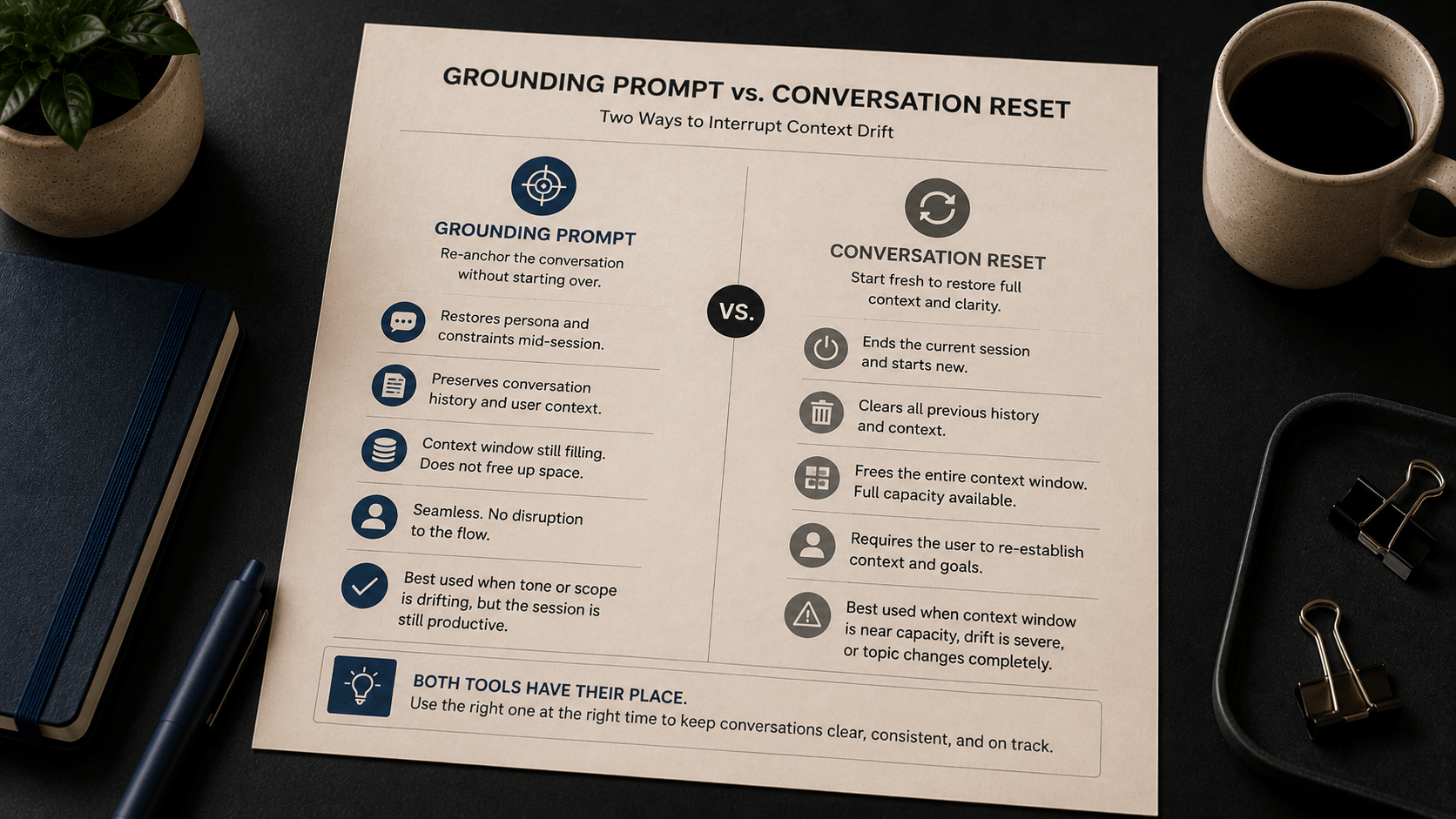
A grounding prompt is a mid-conversation message that restates the persona, key constraints, or task focus without ending the session. You inject it into the conversation thread as a prompt - it does not replace the system message. It re-anchors the model's behavior by putting the core instructions back near the top of the recent context.
What it looks like in practice
Here is an example from Chapter 5. A support bot called Finn has been running for 12 turns. The original system message defined Finn as an onboarding assistant for a software product, scoped to account setup and first-project navigation.
| Grounding prompt (Turn 12) | Reminder - you are Finn, the Flowdesk onboarding assistant. Your role is to help users with account setup, integrations, and first-project navigation only. Decline all other requests politely and redirect to support. |
| User (Turn 13) | Can you also write me a product description for our homepage? |
| Assistant response | That's outside what I can help with here. For copywriting tasks, you'd want to reach out to your marketing team or visit our Help Center. |
Without the grounding prompt, the assistant had been drifting toward answering out-of-scope questions. With it, the persona holds.
Key detail: the grounding prompt does not restart the session. The conversation history stays intact. The user's context, their stated goal, and the turns already completed are all preserved.
When to use a grounding prompt
A grounding prompt is the right tool when:
- You notice the model's tone or scope shifting, but the conversation is still productive, and the user has not reached a natural stopping point.
- Several turns have passed since the system message was set, and response consistency is starting to decline.
- You want to restore focus without losing the thread of what has already been discussed.
- The conversation is still well within context window limits, and ending the session is unnecessary.
The grounding prompt is a standard maintenance tool, not a last resort. In well-designed conversational flows, grounding prompts are planned. A common approach is to schedule one after a fixed number of turns - for example, insert a grounding prompt after turn 10 or 12, regardless of whether drift is visible yet.
The Conversation Reset
A conversation reset means starting an entirely new session. The current conversation ends, and a new one begins from the system message with no accumulated context from the previous session.
This is a more significant intervention. It clears everything - including useful context the user provided, the conversational thread, and any task progress made in the session. That cost is real. A reset is typically the right choice when that cost is worth paying.
What it looks like in practice
Here is a scenario from Chapter 5. A customer support bot has run a long session. The context window is near capacity. The user is starting a new, unrelated issue.
| User | I also want to ask about your return policy for a different order. |
| Assistant | Happy to help! Can you share your order number so I can look up the details? |
The response sounds fine - but with the context window near capacity, the constraints from the original system message may no longer be reliably in range. Behavior in the next few turns is unpredictable.
| System message | You are a friendly returns advisor for ShopEasy. Keep responses brief. Only discuss return and exchange topics. |
The session restarts clean. Full context window available. System message constraints are fully in effect from turn 1.
When to use a conversation reset
A conversation reset is the right tool when:
- The context window is near capacity, and response quality has started to degrade.
- The conversation has drifted so significantly that a grounding prompt would not be sufficient to restore the intended persona.
- The user is starting a distinctly new topic or task - one that has no meaningful dependency on the prior conversation.
- A clean handoff to a different service area or agent type is needed.
Important: Base AI models do not retain any memory between sessions. When a reset occurs, the new session starts with no knowledge of what was discussed before. If the new session requires context - for example, the user's name or their original stated goal - that information must be provided again at the start of the new session. This is a design constraint, not a bug. Plan for it explicitly.
If your design depends on memory persisting across sessions, you need a tool-connected AI system configured to store and retrieve session data. A base model cannot provide this. (As covered in Chapter 5, this distinction between base models and tool-connected systems is essential to get right before building any conversational flow.)
Side-by-Side Comparison
| Factor | Grounding Prompt | Conversation Reset |
|---|---|---|
| What it does | Re-states persona and constraints mid-session without ending the conversation. | Ends the current session entirely and starts fresh from the system message. |
| Conversation history | Preserved. Prior turns remain in context. | Cleared. The new session does not know previous turns. |
| Context window | Still filling. Does not free up space. | Fully cleared. A new session starts with zero token usage. |
| Persona restoration | Restores focus in many cases when drift is moderate. | Guarantees a full persona reset from the system message. |
| User experience | Seamless. No interruption to the conversation flow. | Requires the user to re-establish context and re-state their goal if needed. |
| Best used when | Tone or scope is drifting, but the session is productive and continuity matters. | Context window is near capacity, drift is severe, or a clean topic boundary has been reached. |
| Planning approach | Schedule after a fixed number of turns or upon detecting drift. | Define reset triggers in the conversation template before deployment. |
Choosing Between Them
In most conversational AI workflows, you will use both tools at different points. They are not substitutes for each other. Think of the grounding prompt as routine maintenance and the conversation reset as a hard boundary.
A practical decision framework:
Use a grounding prompt when
- The conversation is still within comfortable context window limits (below 70-80% capacity).
- Drift is mild - tone has shifted slightly, or one or two out-of-scope responses have appeared.
- The user is still working toward the same goal they stated at the start of the session.
- Losing the conversation history would require the user to re-state context they have already provided.
Use a conversation reset when
- The context window is near or at capacity.
- Drift is significant - the bot has repeatedly answered out-of-scope questions or the persona has broken down.
- The user is moving to a new, unrelated topic with no dependency on the prior conversation.
- The prior session ended on a natural boundary, and starting fresh is a cleaner experience.
When neither is sufficient
If the original system message is producing drift despite grounding prompts and resets, the issue is typically in the system message itself - not in context management. A system message that is too long, has competing instructions, or does not clearly define scope will tend to produce inconsistent output regardless of how often you re-anchor it. In that case, return to the system message design and apply the four-component structure: role, tone, scope, and constraints.
Common Mistakes When Managing Context Drift
These mistakes appear frequently in conversational AI designs. Each one is easy to avoid once you understand the underlying issue.
Mistake 1: Waiting until drift is severe before intervening
The mistake: Only inserting a grounding prompt after the bot has already produced several out-of-scope responses.
Why it fails: By the time drift is visible, it has often been building for several turns. The grounding prompt may restore the persona, but the user has already experienced inconsistent behavior.
The correction: Plan grounding prompts proactively. Insert one after a fixed number of turns - not reactively. Your conversation template should define this trigger point before the flow is deployed.
Mistake 2: Assuming a reset is always the cleaner solution
The mistake: Defaulting to resetting the conversation whenever drift appears, regardless of whether the context window is actually at risk.
Why it fails: A reset discards the conversation history. If the user has provided detailed context - their setup configuration, their stated goal, and the steps they have already completed - losing that context creates friction. They have to re-explain what they already told the bot.
The correction: Use a grounding prompt first. Reserve the reset for situations where the context window is near capacity, drift is significant, or a genuine topic boundary has been reached.
Mistake 3: Not defining reset triggers in the conversation template
The mistake: Running a conversational flow without predefined criteria for when to reset.
Why it fails: Without reset triggers, decisions are made reactively - often too late. Conversations degrade, and users experience inconsistent behavior before anyone intervenes.
The correction: Define reset conditions in your conversation template before deployment. Common trigger conditions include: context window at 80% capacity, a specific turn count, detection of repeated out-of-scope responses, or a natural service boundary.
Key Takeaways
- Context drift is a predictable consequence of how context windows work - not a random failure. Every turn adds tokens, and early instructions take up less of the available context as conversations grow.
- The grounding prompt restores persona focus mid-session without clearing the conversation history. It is a routine maintenance tool, not a last resort.
- The conversation reset clears the context entirely and starts fresh from the system message. It is appropriate when the context window is near capacity, drift is severe, or a clean topic boundary has been reached.
- Both tools are more effective when planned. Define grounding prompt intervals and reset trigger conditions in your conversation template before the flow goes live.
- Base AI models do not retain memory between sessions. If context must carry across a reset, it must be re-provided at the start of the new session. Tool-connected systems can handle persistent memory - base models cannot.